AI Picked Our Colors — They're the Most Generic Thing Here
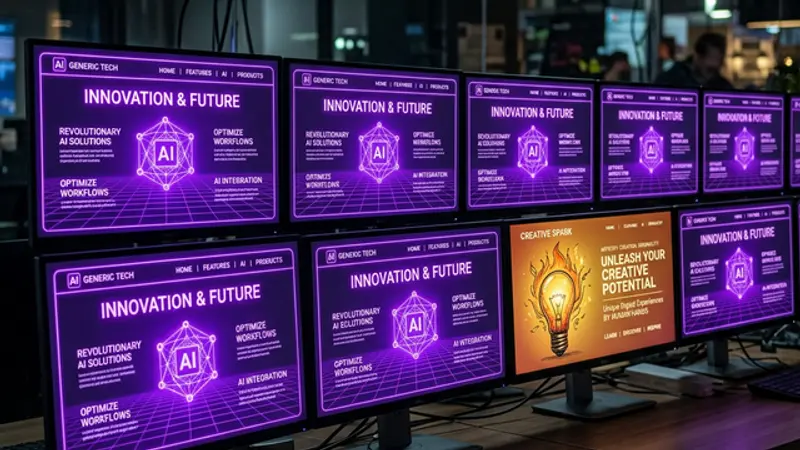
Purple gradients, neon glows, dark backgrounds — our AI-assisted website looks like every 'futuristic' tech site ever made. Here's why we kept it anyway, where AI taste fails, and how to pick better colors when your AI defaults to generic.
We Built a Beautiful Website With AI — Then Realized It Looks Like Everyone Else's
AI-generated web design consistently defaults to the same color palettes because models are trained on the same popular design trends. Purple. Neon cyan. Dark backgrounds. Glowing borders. Glassmorphism. Gradient text.
If you've browsed any AI-built portfolio or tech website in the last two years, you've seen this palette. It's the visual equivalent of a stock photo — technically beautiful, instantly forgettable.
Our website uses it. All of it.
This is the most honest article on the site: a deep dive into why AI picks the same colors every time, where these defaults actually work, and what to do when you realize your carefully crafted website looks like a neon purple clone of every other AI-assisted project on the internet.
The "Cool Tech Site" Starter Pack
Ask any AI to design a technology website and you'll get some combination of:
- Deep purple (#a855f7, #7c3aed) — the unofficial color of "innovation"
- Neon cyan/teal (#06b6d4, #22d3ee) — the accent that says "futuristic"
- Dark navy/black background (#0a001e, #0c0118) — "premium" darkness
- Gradient borders — purple to cyan, always
- Glow effects — box-shadow with 15-30px purple blur
- Glassmorphism — frosted glass panels with background blur
Our site uses every single one of these. Our CSS variables file reads like a prescription for generic tech aesthetics:
--neon-purple: #a855f7;
--neon-blue: #06b6d4;
--bg-primary: var(--deep-void);
--glow-soft: 0 0 30px rgba(168, 85, 247, 0.15);
We're not special. We're not unique. We're purple.
Why AI Defaults to This Palette
AI models generate what they've been trained on, and the training data is dominated by popular design. Here's the feedback loop:
- Designers create trendy websites → dark mode + purple + neon glow
- These sites get shared and upvoted → overrepresented in training data
- AI models learn "tech = purple dark mode" → default generation
- People build sites with AI → more purple dark mode sites
- Loop repeats → the aesthetic becomes self-reinforcing
The result is AI aesthetic convergence — every AI-assisted tech website gravitates toward the same visual identity because the models have been trained on the same pool of high-engagement designs.
This isn't a bug. It's a statistical inevitability. The AI isn't being lazy — it's giving you the most statistically successful color scheme for a tech website. The problem is that "most successful" and "most common" are the same thing.
Where It Actually Works (And We Got Lucky)
Here's the uncomfortable truth: the generic palette works for us. Our brand is literally about AI building websites. The neon-purple-dark aesthetic signals "AI" and "technology" immediately. Visitors arrive and instantly know they're on a tech site.
The palette also works because our content differentiates. When your blog cards flee from cursors and your articles argue with each other, the color scheme becomes background. Nobody says "that purple glow is generic" when a speech bubble pops up saying "My article made WordPress cry."
Interactive design covers for generic aesthetics. If your site behaves uniquely, it looks unique — even if the colors are the same as 10,000 other sites.
But we got lucky. We had interactive features to compensate. Most AI-built sites don't, which means the generic palette is all they have — and it's not enough.
The Real Problem: AI Can't Taste
Color selection requires cultural context, brand awareness, and subjective judgment. AI has none of these.
When we said "make it look cool," the AI heard "apply the most popular tech aesthetic." It didn't consider:
- Our brand personality — irreverent, snarky, self-aware (which might call for warmer, quirkier colors)
- Competitive landscape — every other AI site uses the same palette
- Emotional targeting — purple conveys innovation but also distance; warmer tones convey approachability
- Accessibility — low-contrast neon on dark backgrounds fails WCAG guidelines for some text sizes
The AI optimized for visual appeal without considering brand fit. Those are different things, and the difference matters.
How to Break the Loop
If you're building with AI and want to avoid the generic palette, here are practical techniques:
1. Give Specific Color References
Instead of: "Make it look modern and clean" Try: "Use the color palette from Linear.app — muted grays, subtle blue accents, very minimal color"
Specific references override the default aesthetic. The AI can match a reference far better than it can invent a unique palette.
2. Specify Colors You DON'T Want
"No purple. No neon. No dark mode unless I ask for it."
Negative constraints are powerful because they block the default path. The AI has to find alternatives, which are often more interesting.
3. Start With a Color Tool
Use coolors.co, Realtime Colors, or Huemint to generate a palette before involving AI. Then give the AI the hex codes as constraints.
This separates color selection (where AI struggles) from color implementation (where AI excels). Let the tool handle taste; let the AI handle CSS.
4. Ask for Mood, Not Aesthetic
"I want the site to feel warm and inviting, like a coffee shop" produces more unique results than "I want a modern tech aesthetic." Mood-based descriptions tap into different training data than aesthetic descriptions.
5. Iterate With Feeling-Based Feedback
"This looks too much like every other AI website" is valid feedback. The AI can respond to comparative criticism and push toward differentiation. But you have to name the problem clearly.
What We'd Change
If we rebuilt the color scheme today:
- Keep dark mode — it works for our content and brand tone
- Replace pure neon purple with a warmer, more distinctive purple — maybe something shifted toward magenta or rose
- Ditch the cyan accent — replace with an unexpected warm color (amber, coral, or sage green)
- Reduce glow effects — they're the most "generic AI" signal on the site
- Add texture — grain overlays, subtle noise, or halftone patterns break the flat digital look
But would we actually do it? We've thought about it. The answer, honestly, is: maybe later. The current palette works. It's not memorable for its colors, but it's memorable for its interactions. And there's always more engineering to do before we redesign the paint.
The Honest Takeaway
AI is an extraordinary tool for web development. It's not a reliable tool for web taste.
When we said "make it look cool," the AI delivered exactly what the internet has collectively agreed "cool" looks like. The problem isn't the AI — it's that we didn't override the default with specificity. We accepted the purple because it was cool. We just didn't realize how many other people got the exact same "cool."
Our website is unique because of its behavior, not its colors. Next time, we'll be more intentional about both. In the meantime, enjoy the purple. The AI worked very hard on it. For the full story of how AI shapes every aspect of our design process, see our guide to AI-assisted design.