Stop Prompting — Start Planning
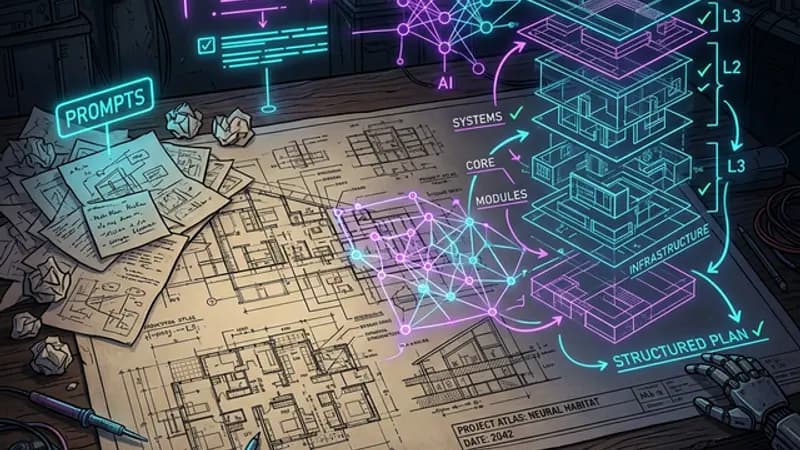
For complex features, writing a detailed implementation plan and iterating on it with AI produces dramatically better results than prompt engineering. Spend hours on the plan. Let the AI handle the code.
Prompt Engineering Is the Wrong Tool for Serious Work
For any AI project larger than a single-file change, an implementation plan outperforms prompt engineering by an order of magnitude. The plan is where the thinking happens — the prompts are just how you click "go." If you're spending your time crafting the perfect AI prompt, you're optimizing the wrong layer.
Prompt engineering works when you need a single output: a function, a component, a paragraph. Ask the right way, get the right thing. Fine.
But the moment your project involves multiple files, interdependent systems, design decisions that cascade, or features that need to work together — prompt engineering collapses. You can't prompt your way through a complex feature. You need a plan.
We built every major feature on this site — fleeing cards, the AI companion, the hidden puzzle, the admin dashboard — not with clever prompts, but with implementation plans that we spent hours writing and refining before a single line of code was generated.
What an Implementation Plan Actually Looks Like
An implementation plan is a structured document that describes:
- What you're building — the goal, the user experience, the behavior
- Why you're building it — the problem it solves, what's missing without it
- How it should work — component by component, file by file
- What could go wrong — edge cases, conflicts, performance concerns
- How you'll verify it — what "done" looks like, what to test
This isn't a specification document. It's a thinking document. The act of writing the plan forces you to think through decisions you'd otherwise discover mid-implementation — when fixing them is 10x harder.
Here's what a real plan section looks like from this site's development:
Smart Scheduler: The admin dashboard needs a scheduling feature that auto-publishes draft posts at 2/day. Posts should get random hours between 6AM-8PM to look organic. The scheduler must check existing scheduled dates to avoid slot conflicts. Published posts with future scheduledDates should be hidden from the public blog — handled server-side by filtering in getAllPosts(). No cron jobs needed.
That paragraph contains 6 design decisions. Writing it took 5 minutes. Discovering those 6 decisions through trial-and-error prompting would have taken an hour and produced 6 bugs.
The 3-Hour Plan That Builds in 20 Minutes
The pattern looks like this: you spend 3 hours on the plan. Then you tell the AI "build section 1" and it's done in 5 minutes. "Build section 2." Done. "Build section 3." Done.
The implementation is fast because the decisions are already made. The AI isn't guessing what you want. It isn't interpreting ambiguous instructions. It's executing a plan that you've already thought through.
Compare this to the prompt engineering approach:
- Write a prompt → get output → it's wrong
- Rewrite the prompt → better, but misses edge case
- Add more detail to prompt → now it's over-constrained
- Start over with a "system prompt" → different wrong
- Try a "chain of thought" approach → still doesn't know your architecture
All of that work is the AI trying to reconstruct the plan you never wrote. You're spending the same 3 hours — but you're spending them debugging outputs instead of thinking clearly.
The Task List Is Your Best Tool
The most underrated AI collaboration technique is the humble task list. Not a backlog. Not a Jira board. A markdown checklist.
## Blog Admin Dashboard
- [x] Add scheduledDate field to Post interface
- [x] Create getAllPostsAdmin() for fetching all posts
- [x] Build API route for individual post editing
- [x] Build smart scheduler with slot conflict checking
- [ ] Add thumbnail upload with auto-compression
- [ ] Add content body editor
Here's why this works:
It gives you a place to iterate. You write the first draft of the list. You stare at it. You rearrange items. You realize item 4 depends on something you forgot. You add it. You notice two items can be merged. You sleep on it.
This is the planning that prompt engineering skips entirely. You can't "sleep on a prompt." You can sleep on a task list.
It gives the AI context. When you share this list with an AI and say "build the next unchecked item," the AI understands:
- What's already been built (checked items)
- What's coming next (unchecked items)
- How this piece fits into the larger system
No prompt engineer can compress that context into a single instruction.
It gives you momentum. Checking off items is addictive. The list shows progress. It shows what's left. It prevents the "what do I work on next" paralysis that kills complex projects.
Cooking Time Is Engineering Time
Sometimes you need to let an idea sit. We call this "cooking."
The blog card fleeing system didn't arrive fully formed. The idea of "cards that run from your cursor" came first. Then it sat in a notes document for two days. During those two days, without actively working on it, the idea evolved:
- Day 1 afternoon: What if they leave behind a ghost when they flee?
- Day 2 morning: What if each card has a personality that changes the flee behavior?
- Day 2 evening: What if two cards could argue with each other about who fled first?
None of these ideas came from prompting. They came from not prompting — from walking around with the idea in your head and letting it connect with other ideas organically.
Prompt engineering culture is obsessed with speed. Write the prompt, get the output, ship it. But the best features come from slow thinking followed by fast execution. Spend the time cooking. The AI will still be there when you're ready.
The Plan Evolves — That's the Point
A common objection: "But what if the plan is wrong?"
Plans are always wrong. That's the point. They're wrong in ways you can see and fix before you've written code.
Here's how plan iteration works in practice:
- First draft — Write everything you think you need. Don't censor.
- First review — Share it with the AI. Ask "what am I missing?" The AI catches things like: "You mention a schedule API but don't handle the case where all slots are taken."
- Refinement — Fix the gaps. Add edge cases. Remove things that turned out to be unnecessary.
- Execution — Now build it, section by section, with a checklist.
The plan changes during execution too. You discover that section 3 needs a different approach. You update the plan. You adjust the remaining checklist. This is normal. This is engineering.
The difference is that you're changing a plan — not rewriting prompts from scratch because the AI produced something unexpected.
Why This Works With Modern AI
Modern AI coding assistants — working inside IDE environments with full project context — are exceptionally good at executing well-defined sections of work. They can read your existing files, understand your types, follow your patterns.
What they can't do is make your design decisions for you. They can't decide whether your scheduler should use cron jobs or request-time filtering. They can't decide whether your blog cards should flee smoothly or teleport. They can't decide whether your color scheme is too generic for your brand.
Those decisions belong in the plan. Once they're made, the AI executes them flawlessly.
The division of labor is:
- You: Vision, architecture, decisions, taste
- AI: Implementation, patterns, syntax, speed
- The plan: The contract between you
Implementation Planning vs Prompt Engineering
| Prompt Engineering | Implementation Planning | |
|---|---|---|
| Time investment | 30 min crafting prompts | 1–4 hours writing the plan |
| Works for | Single-file tasks | Multi-file features |
| Context | One prompt at a time | Entire project architecture |
| Iteration | Rewrite the prompt | Update the document |
| Knowledge capture | Lost after the chat | Permanent reference |
| Edge cases | Discovered in production | Discovered in planning |
| Collaboration | Can't share a prompt context | Can share a document |
Start Here
If you've never written an implementation plan for AI work:
- Start with a goal sentence — One line: what are you building and why?
- List the components — What files, APIs, or systems are involved?
- Write the decisions — For each component, what choices need to be made?
- Add a checklist — Break the work into checkable items.
- Sleep on it — Come back tomorrow and see what you missed.
- Then build — Section by section, checklist item by checklist item.
The prompts will be simple. "Build the API route from section 2 of the plan." "Implement the scheduler logic I described." "Add the upload feature from the checklist."
You don't need a better prompt. You need a clearer vision — and a plan that captures it. Implementation planning is just one technique in a broader AI productivity stack that fundamentally changes how you build with AI.