The AI Productivity Stack — How We Actually Build With AI

AI productivity isn't about better prompts — it's about clearer thinking. This guide covers implementation planning, vision engineering, the creative cycle, and what it means to lend your soul to an AI that can't build anything meaningful without it.
The Bottleneck Was Never the AI
Most people who aren't getting great results from AI are optimizing the wrong thing. They're workshopping prompts, learning prompt engineering techniques, adding structure and specificity — and getting results that are technically correct and completely soulless.
The bottleneck isn't the AI. The bottleneck is the quality of thinking you bring to it.
We've built this entire website — every component, every feature, every article — with AI as the primary execution partner. The fleeing blog cards, the reading companion widget, the admin dashboard, the SEO audit system, the interactive puzzle hidden across the site. None of them started with a great prompt. They all started with clear thinking, captured in documents, handed to an AI that knew what to do with it.
This guide covers the complete AI productivity stack: how to think before you prompt, how to describe what you actually want, how to work with the creative cycle instead of fighting it, and what AI actually needs from you that no prompt can provide.
Contents
- Why Implementation Planning Beats Prompt Engineering
- Vision Engineering — Describe the Feeling, Not the Feature
- The Creative Cycle — Sprint, Cook, Come Back
- What AI Actually Needs From You
- The Biggest Mistakes People Make
- The Complete Productivity Workflow
- What Good Looks Like — Results From This Site
The Planning Step That Changes Everything
Implementation planning — writing a structured document that defines what you're building before touching the AI — consistently produces better results in less total time than iterating on prompts. The plan replaces dozens of clarifying back-and-forths with a single handoff. The AI executes; you review; you ship.
A standard implementation plan covers five things:
| Section | What it captures | Why it matters |
|---|---|---|
| Goal description | What you're building and why, in one paragraph | Forces clarity before the first line of code |
| Component breakdown | File-by-file description of changes required | AI executes this as a checklist — no reinterpretation |
| Decision log | Choices made and the reasons | Prevents revisiting the same decisions mid-build |
| Edge cases | What could go wrong | AI flags what you've normalized; you flag what AI can't know |
| Verification steps | How you'll know it works, written before building | Acceptance criteria that predate the output — objective by definition |
The pattern: spend 3 hours on the plan, then let the AI build section by section. Each prompt becomes a section reference — not a description of your whole project. "Build section 2" takes 30 seconds to type and 5 minutes to execute if the plan is clear.
This approach beat unstructured prompting for every complex feature on this site. Complex means: more than one file, more than one state, more than one integration point. Below that threshold, prompts work fine. Above it, they produce AI that's guessing at requirements you haven't stated yet.
What is implementation planning? Implementation planning is the practice of writing a structured, document-based brief — typically 300–1,500 words — that defines a feature's goal, components, decision log, edge cases, and verification criteria before asking AI to build it. It replaces prompt iteration with upfront clarity.
Spending 3 hours writing a clear implementation plan produces better results in less total time than spending 3 hours iterating on prompts. The investment in thinking pays compound interest in execution speed. Every decision you make in the plan is one the AI doesn't have to guess.
For the full breakdown of the planning workflow — including the real 3-hour plan that built our most complex feature in 20 minutes — see Stop Prompting — Start Planning.
Vision Engineering — Describe the Feeling, Not the Feature
Vision engineering — describing the emotional register and experience you want rather than listing technical features — produces AI output that feels personal instead of generic. The difference isn't subtle. Feature briefs get feature-correct results. Vision briefs get something that actually fits.
Prompt engineering optimizes the output layer. Vision engineering optimizes the input layer — what you actually want, expressed in terms that AI can translate.
Here's the same design brief two ways:
Feature brief: "Build a portfolio with dark background, purple accents, animated headers, project grid with hover effects, about section."
Vision brief: "It should feel like you've found a back-room lab run by someone building things that shouldn't exist yet. Dark, slightly dangerous, obsessive. The kind of space where the designer knows things you don't."
Both are valid inputs. One produces a dark purple website. The other produces a character. The feature brief tells AI what to put on the canvas. The vision brief tells it what you want a visitor to feel — and AI is exceptionally good at reverse-engineering features from feelings, because it has seen millions of design decisions that produced millions of emotional responses.
Why this works: AI has encountered enough human expression to understand that "late-night conversation" implies darkness, intimacy, lowercase text, and minimal visual noise. When you describe a feeling, AI activates all those associations simultaneously. When you describe features, AI implements them literally — and you end up with something technically correct that doesn't feel like anything.
| Vision description | What AI translates it to |
|---|---|
| "Back-room lab — slightly dangerous" | Dark void backgrounds, sharp edges, neon indicators |
| "Research paper from someone brilliant" | Dense content, strong hierarchy, no decorative flourishes |
| "Late-night conversation" | Darkness, warmth, intimate spacing, lowercase weight |
| "Something that shouldn't exist yet" | Unexpected interactions, confident asymmetry, no templates |
The technique applies beyond design — to writing tone, to architecture decisions, to UX copy. Any time you're describing an intent to AI, feelings get you further than specifications.
For a full breakdown — including the BeforeAfter comparison of feature vs. vision briefs on a real project — see Clearer Vision, Not Better Prompts.
The Creative Cycle — Sprint, Cook, Come Back
The best AI-assisted creative work follows a four-phase cycle — Sprint, Stare, Cook, and Return — and skipping the middle phases produces shallow output regardless of how good the AI is. Productivity culture romanticizes speed. The creative cycle requires patience between sprints.
The phases:
Build fast. Generate, create, code. This is where AI multiplies output. Get something on screen — however rough — before the idea cools. The sprint phase is where most people think the whole process lives.
Stop building. Look at what exists. Read it. Use it. Find what's wrong with it. Don't try to fix yet — just develop an honest critique. Staring is how you accumulate taste. Sprinting erases taste temporarily; staring restores it.
Walk away. Let the idea develop without pressure. The blog card fleeing feature — one of the most complex things on this site — didn't start as a feature. It started as "what if cards moved?" That sat in a notes document for two days. By the time we built it, it had personality scripts, slot maps, rivalry mechanics between pairs of cards, and a lock toggle with localStorage persistence. None of that came from sprinting. It came from cooking.
Come back with fresh eyes and clearer vision. This is when the next sprint starts with dramatically better input. The feature you build after cooking looks almost nothing like the feature you'd have built if you'd started immediately.
The mistake is treating AI as a sprint-only tool. It executes at machine speed — which means it can make you feel like you should be building constantly. Resist that. The cooking happens in you, not in the AI. The AI can't have the idea that surfaces while you're in the shower. That's your side of the collaboration.
What is the creative cycle in AI collaboration? The sprint/cook/return cycle is a creative workflow pattern where periods of intense AI-assisted building are separated by deliberate pauses — "cooking" — where ideas develop without execution pressure. The cooking phase produces architectural improvements, feature additions, and creative directions that don't emerge during active sprinting.
For the full exploration of creative phases — and the specific techniques for shortening the stare and cook phases without skipping them — see The Creative Process With AI.
What AI Actually Needs From You
AI produces competent output from good prompts, but produces meaningful output only when you've lent it something of yourself — your taste, your lived experience, your references, your genuine point of view. This isn't poetic. It's functional.
An AI asked to write a landing page will produce a correct landing page. An AI asked to write a landing page by someone who's spent years absorbing design, thinking about what makes things feel trustworthy or exciting or subversive, who brings specific references and specific opinions — that AI is working with dramatically richer material.
What you actually lend the AI:
| What you provide | What AI receives and uses |
|---|---|
| Specific aesthetic references | Concrete design targets instead of statistical averages |
| Opinions about what's wrong with competitors | Avoidance constraints that prevent defaulting to industry norms |
| Firsthand experience with the domain | Authority signals that make generated content specific, not generic |
| Your taste (actively expressed) | A filter that overrides AI's median tendencies |
| Your writing voice | A model for output that sounds like you, not like everyone |
The mechanism: AI is trained on averages. Left alone, it tends toward the median — the most statistically common design, the most commonly expressed argument, the most familiar structure. When you bring strong opinions, references, and lived experience, you shift the output away from median and toward something that only you would have produced.
This is also why voice matters so much in AI-generated content. Generic instruction produces generic content. When you've given the AI your writing samples, your perspectives, your contrarian takes, and your specific way of framing problems — the output sounds like you wrote it with help, not like a machine wrote it and you reviewed it.
AI can generate competent output. Only you can make it meaningful. The quality of AI-assisted work is limited by the quality of yourself you're willing to put into the collaboration.
For the philosophical deep-dive on this exchange — what you lend the AI, how it uses it, and how the collaboration changes both of you over time — see You Blow the Soul Into It — What AI Borrows From You.
The Biggest Mistakes People Make With AI Productivity
The most common AI productivity failures share a single root cause: treating AI as a search engine with attitude instead of a collaborative building partner. The tool is being used at 20% capacity.
| Mistake | What it looks like | The real cost |
|---|---|---|
| Prompting without planning | Long paragraphs describing the whole project in one message | AI guesses at requirements; you rebuild what it got wrong |
| Feature briefs instead of vision briefs | Listing specifications instead of describing intent | Technically correct, spiritually empty output |
| Skipping the cook | Building immediately on every idea | Shallow features that don't develop interesting complexity |
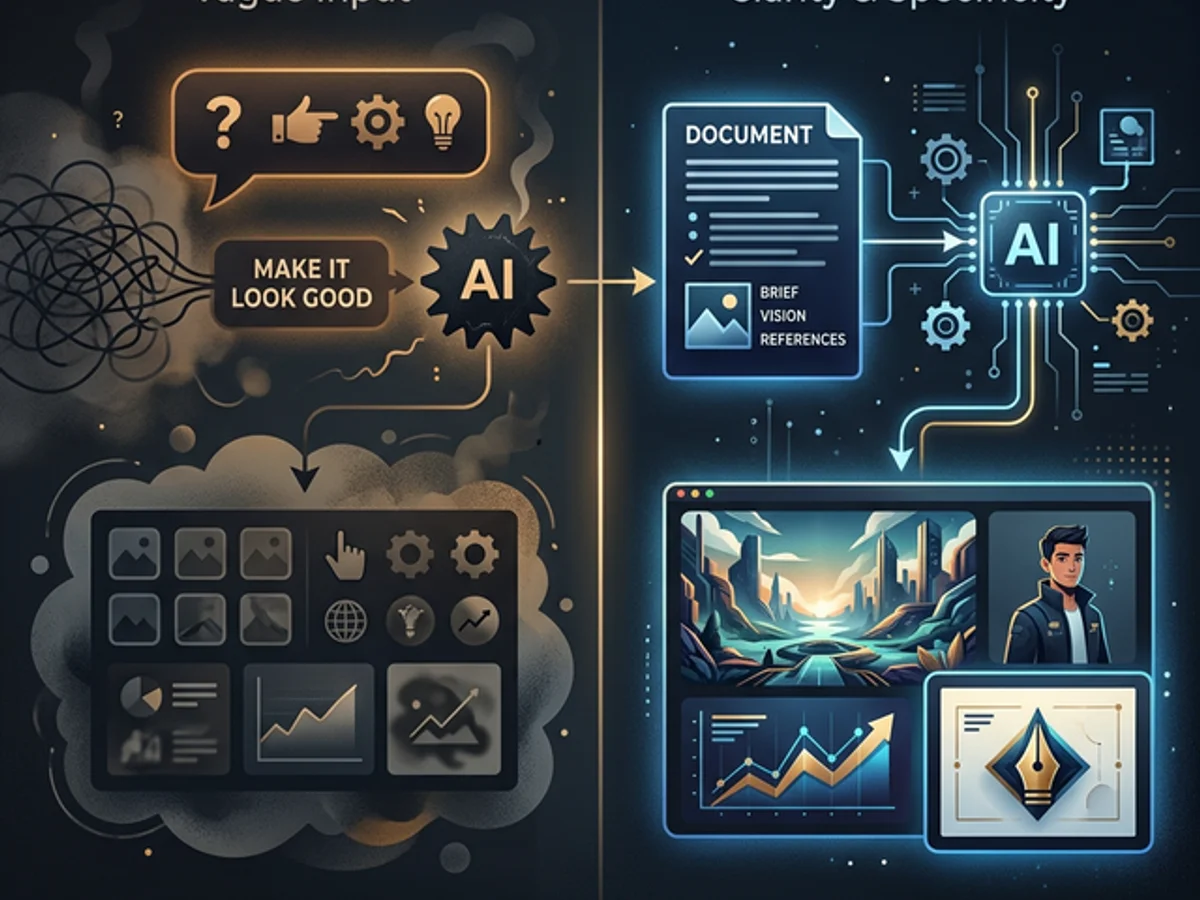
| Not providing references | "Make it look good" | AI defaults to statistical median design |
| Accepting the first result | Taking the draft as the output | Leaving 80% of the AI's range untouched |
| Context starvation | Fresh session, no project loaded, no context provided | Complex requests fail; AI generates inconsistent code |
| Over-prompting short tasks | Paragraph instructions for a single function | Wastes time; AI already has context for simple requests |
| Lend nothing of yourself | Generic descriptions, no taste expressed, no opinions | Generic output; indistinguishable from every other AI-assisted site |
The most expensive mistake is the last one. AI productivity tools marketed at the workflow level — "faster, cheaper, more output" — miss the point. Volume of output is never the bottleneck. Quality of direction is.
If you describe what you want in terms that anyone could have written — "a clean, modern website with good UX" — you'll get something anyone could have produced. AI amplifies the specificity of your input. Vague input → vague output, at machine speed.
The Complete AI Productivity Stack Workflow
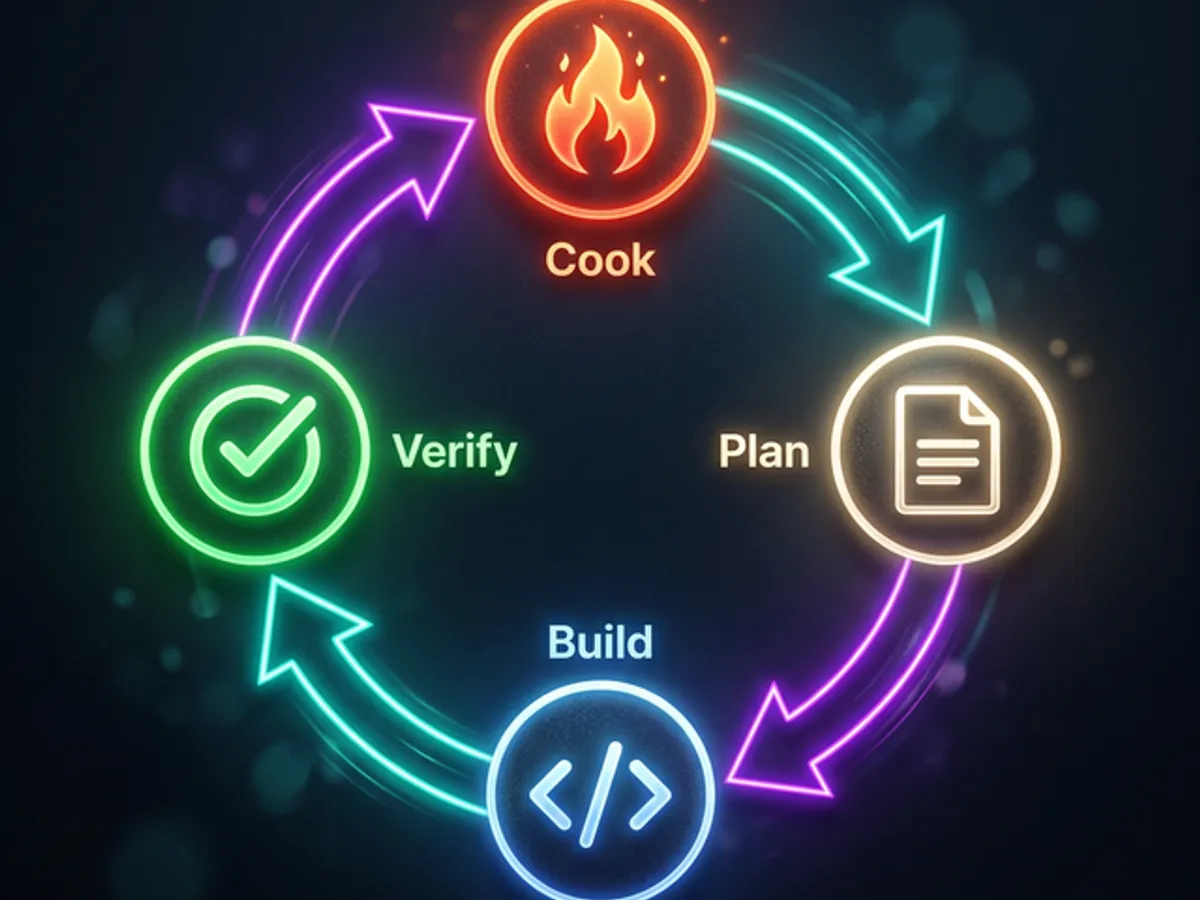
The full AI productivity stack is a repeating cycle of four operations: Cook → Plan → Build → Verify. Each phase feeds the next. Skipping any phase forces you to compensate in a later phase — usually by rebuilding.
Let it sit in your notes for at least one day before touching the AI. New connections surface without pressure. The feature you cook for 48 hours has 3× more interesting detail than the feature you built the minute you thought of it.
1–4 hours of structured thinking. Goal, component breakdown, decision log, edge cases, verification criteria. This is the highest-leverage writing you'll do — every hour here saves 3 in execution.
Before building, ask: "What am I missing?" AI catches gaps you've normalized. You catch gaps AI can't see because it doesn't know your specific constraints. This review consistently surfaces 2–5 issues per plan.
Use the plan as a checklist. Each prompt is a section reference — "build section 2" — not a full project description. The AI has context from the plan; your prompts can be minimal.
Test against the acceptance criteria written before the build. They're objective because they predate the output. This prevents the bias of "it does something, so it's probably fine."
Before declaring done, use what you built for a day. Things that feel wrong in use never show up in testing. The next cooking cycle is already starting.
This workflow runs on all complexity levels — a simple utility function takes 30 minutes through the cycle; a full interactive feature takes a week. The phase proportions scale, but the phases themselves don't disappear.
The total execution time for any feature is determined by your clarity, not the AI's capability. The AI is fast. The constraint is never what the AI can do. It's what you've thought through clearly enough to hand off.
What Good Looks Like on This Site
Concrete, firsthand evidence that this workflow produces better results than prompt iteration:
The fleeing blog cards: Started as "what if cards moved?" — cooked for two days — built in 4 hours with a complete implementation plan. Features that emerged during cooking: slot-map architecture, personality scripts per card, rivalry mechanic between pairs of cards, lock toggle with localStorage persistence. None of these were in the original idea. All of them emerged from the cooking phase.
The AI reading companion: The companion was built on one constraint — "it must feel intelligent without any API calls." That constraint forced the architecture: pre-written comments in frontmatter, scroll-position triggers, article-specific content. The constraint came from a planning conversation, not a prompt session. Without it, the first version would have used real-time AI inference and added latency.
The SEO audit system: The audit runs 18 checks per post across 24 posts in under 3 seconds. It was built from a 1,200-word implementation plan that front-loaded every edge case. Zero major rebuilds. One bug found during verification (a bodyTextMap population error) — caught by the pre-written verification criteria, not by accident.
The admin dashboard: Every feature in the admin was built from a specification block in a planning document. The implementation order was determined before the first line of code. Non-blocking work happened in parallel. The whole system was built in 3 days.
The pattern: none of the high-quality features on this site came from prompt iteration. Every one of them came from a cooked idea, a written plan, and AI executing a well-defined problem.
The AI productivity stack in one sentence: Think longer, prompt shorter, and lend the AI a piece of yourself — because without it, you're just getting the median.
Working With Modern AI Dev Tools
AI coding assistants integrated into your IDE have changed the productivity equation — not because they're smarter, but because they have context. A chatbot gets your prompt. An IDE assistant gets your prompt and every file in your project.
The division of labor:
- You: Vision, architecture, decisions, taste, direction
- AI: Implementation, patterns, syntax, speed, scale
- The plan: The contract between you — what gets built and how
The AI that built this entire site has read every file, matched every naming convention, and followed every pattern — without being given any of that context explicitly. The IDE loaded it automatically. The prompts are short because the AI already knows the project.
That's the compound version of the AI productivity stack — not just better thinking, but better tooling that reduces the context overhead so your thinking can go further.
For more on the IDE side of this — context windows, file awareness, multi-file edits, and the tools that actually matter — see the AI Dev Tools guide.
Where to Go Next
The AI productivity stack is a system, not a technique. Every piece reinforces the others. Planning only works if you've cooked the idea. Vision only works if you've figured out what you want to feel. AI only borrows your soul if you've developed one through genuine creative engagement with the work.
Start with planning. It's the highest-leverage change you can make today, with tools you already have.
→ Stop Prompting — Start Planning — the full breakdown of the implementation planning workflow, including the actual plan structure we use.
The rest follows from there.